

Skip to content
TEEN TECH ACADEMY
RU EN

Your first startup starts here

Together, we take the journey from a simple idea to real IT products. As a result, every student builds finished projects for conferences, diplomas, or launching their own business!

Outcome

What your teenager walks away with

Own online projects. Skill of creating projects from scratch and launching into production. The link can be attached to a resume to prove experience.

  1. Projects online

    Several working products with their own domain, from a simple prototype to a service with a database. Each one opens on a phone — show it instead of describing it.

  2. A GitHub full of real projects

    A GitHub profile with several projects — both big and quite small. A link worth attaching to a CV, showing what your teenager worked on all year.

  3. The experience of defending their projects

    On Demo Day your teenager stands up and explains what problem the product solves, who needs it and what comes next. That skill travels far beyond IT.

  4. Grown-up working habits

    Terminal, VS Code, Git, using AI as a working tool, deadline discipline — the same words you find in junior developer job ads.

Trust us — your teenagers will surprise you.

Case studies

Products our students have already launched

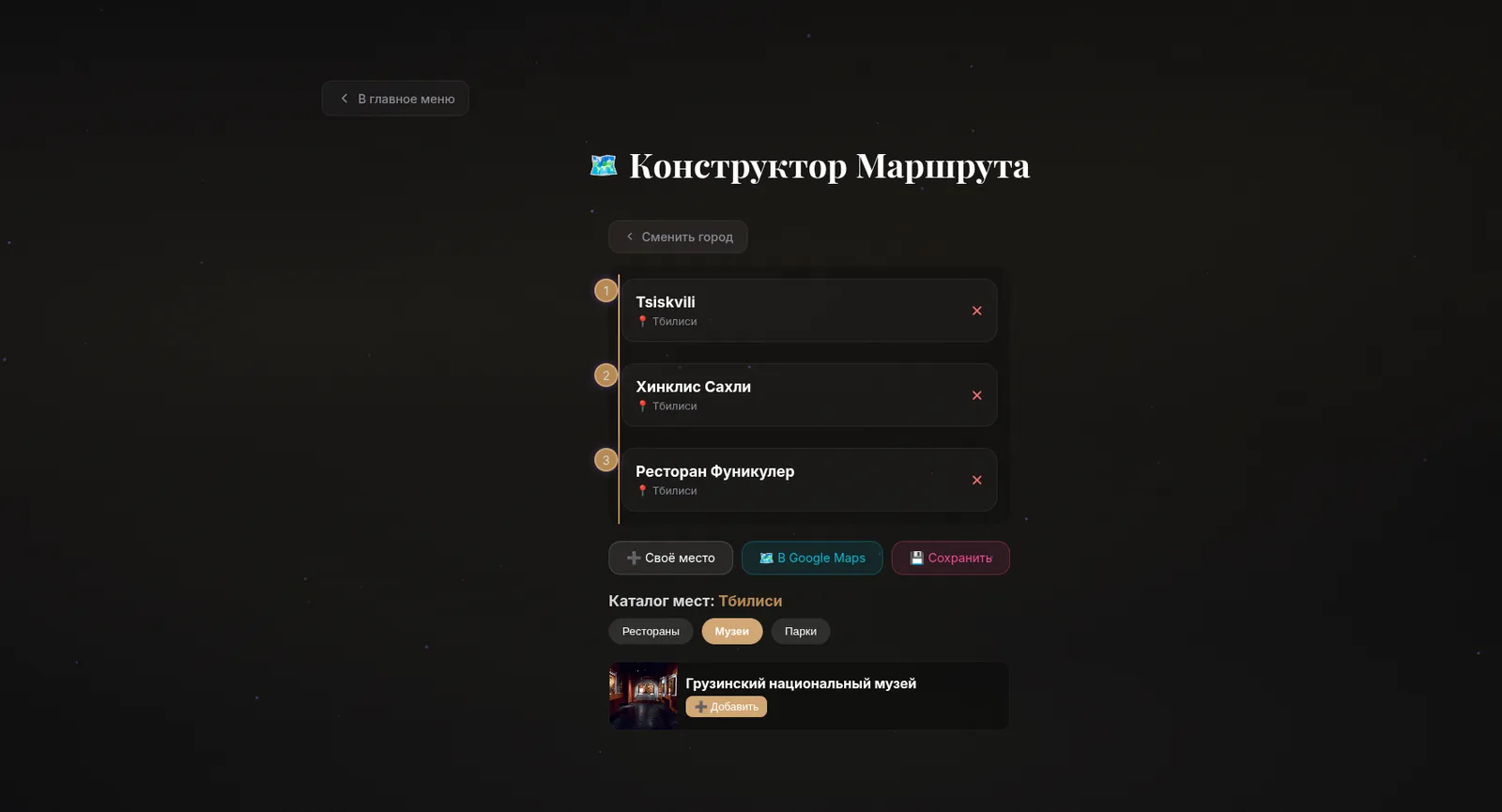
  • Route builder screen with a numbered list of city stops and a catalogue of places below Open the screenshot full size
    Web app

    City Guide — a trip route builder

    A catalogue of restaurants, museums and parks turns into a personal itinerary: add stops, reorder them, save the route and open it in Google Maps.
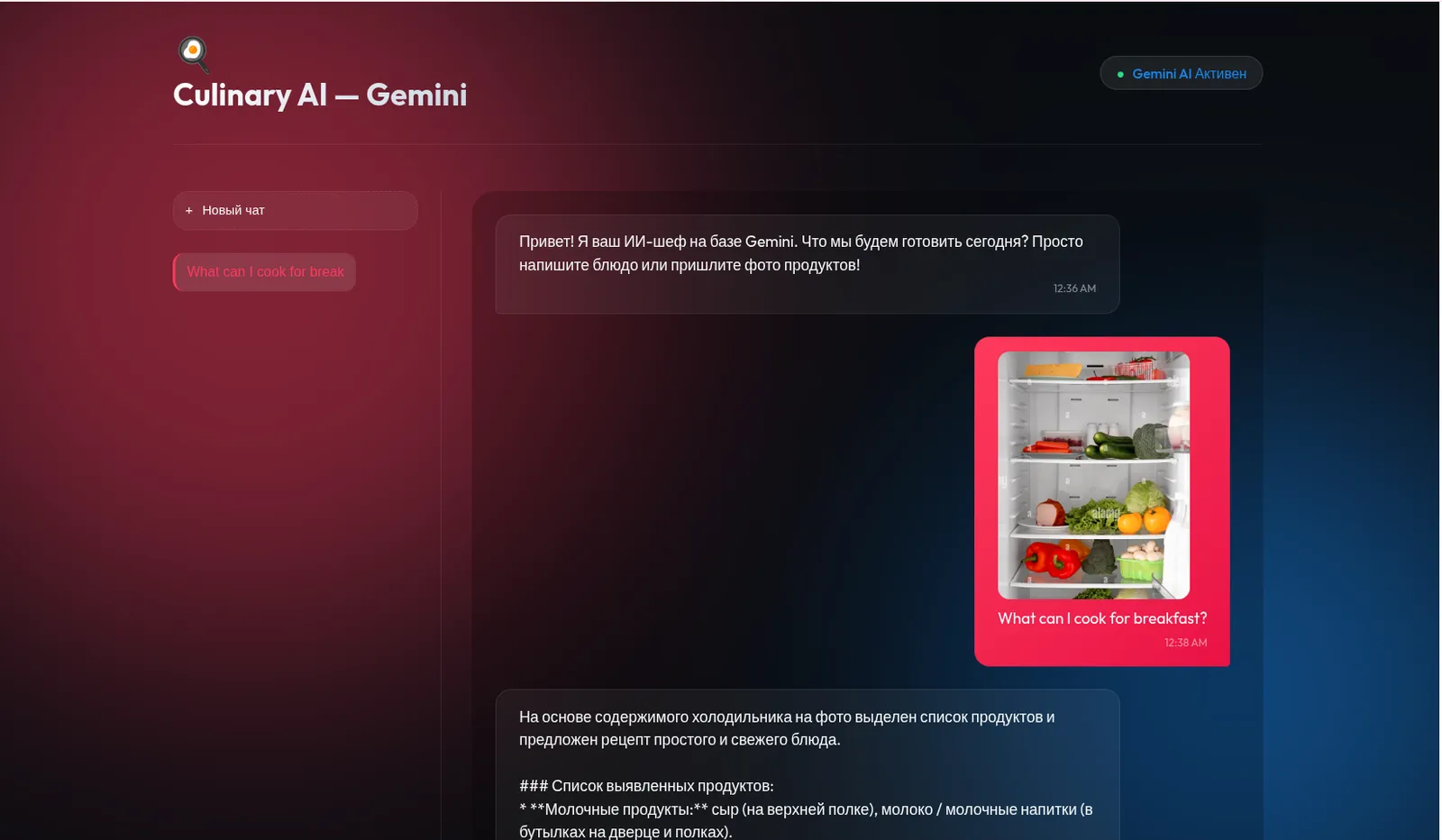
  • Culinary AI chat with a photo of a fridge and a generated ingredient list Open the screenshot full size
    AI assistant

    Culinary AI — a recipe from a photo of your fridge

    A chat assistant on a multimodal model: send a photo of the shelf, it recognises the products and replies with an ingredient list and a recipe you can actually cook.
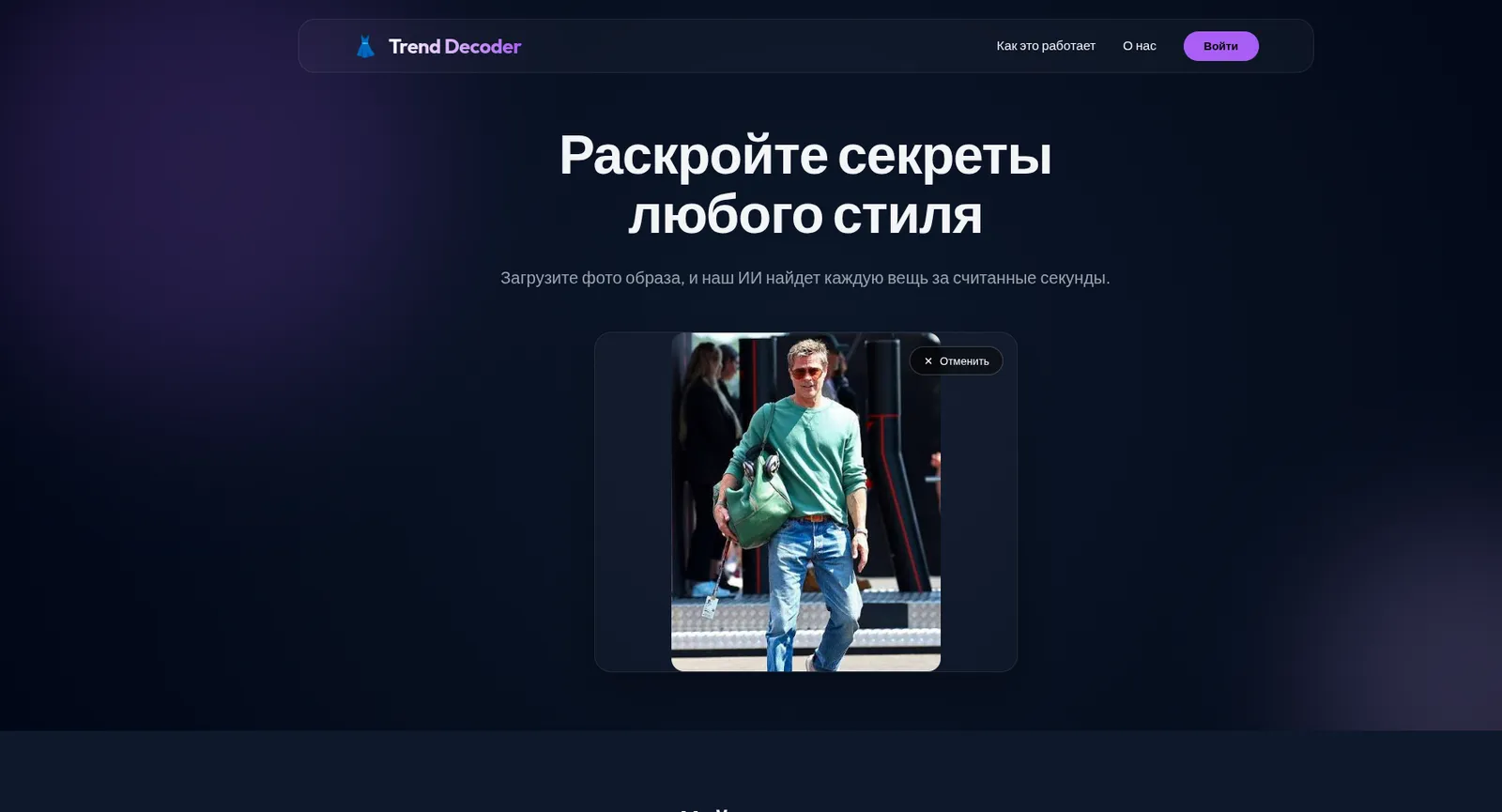
  • Trend Decoder page with an uploaded outfit photo ready to be analysed Open the screenshot full size
    Computer vision

    Trend Decoder — an outfit broken down item by item

    Upload a photo of a look and the AI breaks it down into separate items. A complete product: landing page, onboarding and an image upload flow.
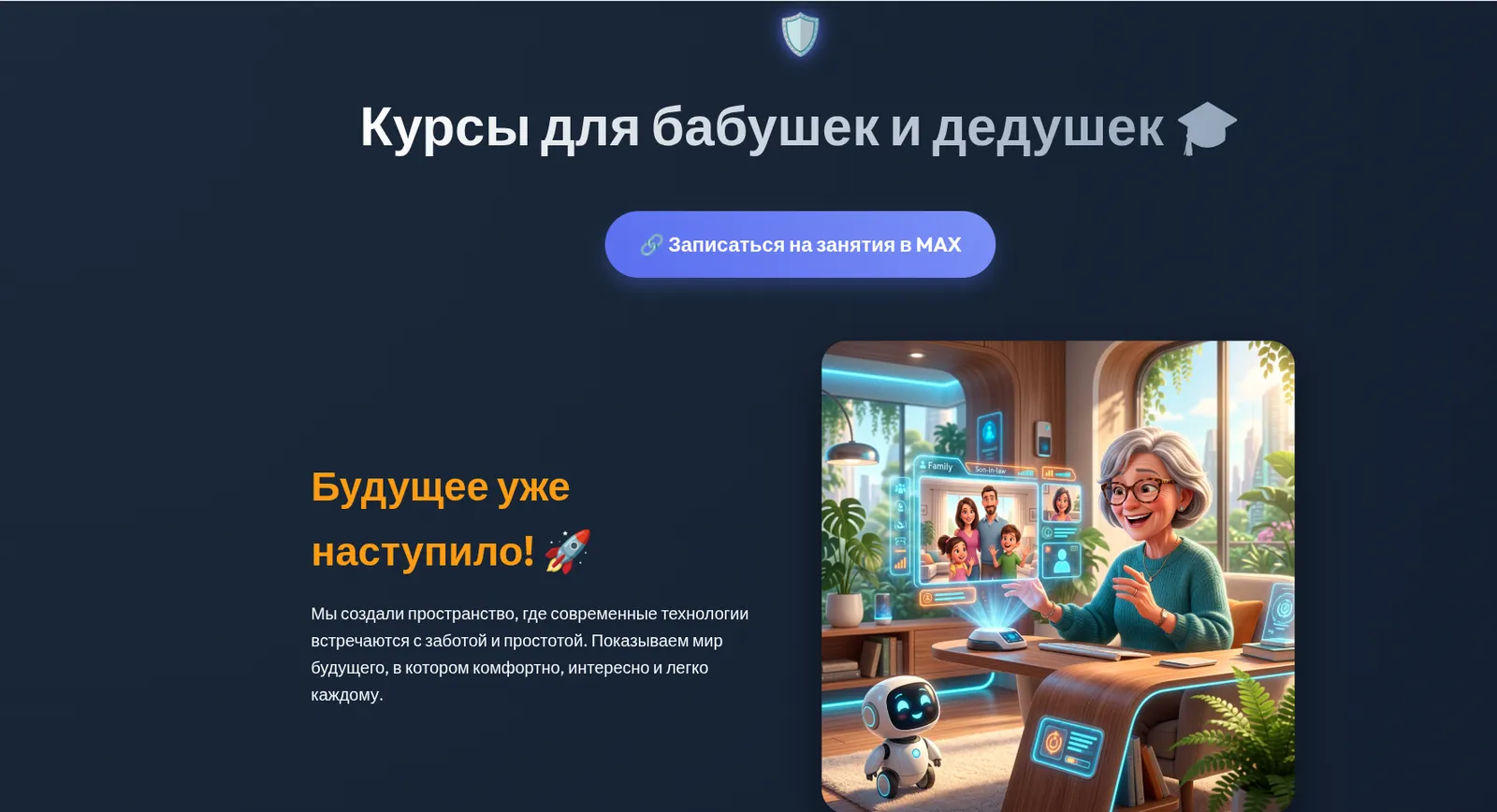
  • Landing page of a digital-literacy course for seniors with an illustrated hero section Open the screenshot full size
    Landing page

    Tech courses for grandparents — a launch page

    A launch page for a digital-literacy course for seniors: positioning, AI-generated illustrations and a one-tap sign-up that lands straight in a messenger chat.

Two tracks

Code and business, side by side

Next to your teenager are two teachers: a programmer and a business tracker. The first helps build the product, the second helps understand why people need it.

Tech track

From an idea to a product you can open by link

Your teenager walks the whole development path — interface, code, database, AI inside the product and deployment to the web.

  • A Figma prototype: how the product looks and how people use it
  • A web app built with HTML, CSS and JavaScript
  • Python, a database and an API — the product remembers its users
  • AI inside the product: prompt engineering, AI agents, OpenAI and Gemini APIs
  • Git, code review and cloud deployment — a live link on its own domain
Who works with your teen Programming teacher
Business track

From an idea to the people who actually need it

In parallel, your teenager tests the idea on real people and learns to explain who the product is for and why.

  • An idea that starts from a real annoyance, not from a made-up topic
  • Customer interviews with real people instead of guesses about users
  • A value proposition: what exactly changes for the customer
  • Competitors and a killer feature — what makes this product different
  • MVP, monetisation and channels: how to test an idea and how it earns
  • The pitch: hook, customer, product, value, MVP, channels, ask
Who works with your teen Business tracker

The business track is part of a single program, not a separate course.

Therefore, the project grows into a full-fledged startup ready for a test launch.

How it works

The lesson gives knowledge, the lab gets it done

Two kinds of meetings

Lesson

New material in a micro-group (3–5 people)

We cover new material in a micro-group and leave with a task to work on independently.

  • The topic is explained on a live example, not apart from the project
  • We work in the same tools that grown-up development teams use
  • Everyone leaves with a specific task to work on independently

The lesson gives knowledge

Lab

Practice with hints from a mentor

Practice time: you can finish the task with hints from a mentor, alongside other first-time founders, or talk through your own ideas and projects.

  • If something does not click, a mentor helps right there, not a week later
  • Other first-time founders are around: you see how everyone else is moving
  • You can discuss your own idea and project, not just finish the task

The lab gets it done

The laboratory develops self-study skills, helping to confidently overcome any difficulties and bring the project to completion.

Team

TEEN TECH ACADEMY Team

A lesson is run by an IT track teacher, a lab by a dedicated mentor, and a business tracker works with the teens on the product and its business side.

  • 4 IT track teachers
  • 2 lab mentors
  • 1 business tracker
  • David Chikvaidze

    David Chikvaidze

    IT Track Teacher

  • Anna Kirilyuk

    Anna Kirilyuk

    IT Track Teacher

  • Luka Zhamerashvili

    Luka Zhamerashvili

    IT Track Teacher

  • Nataliia Krasilnikova

    Nataliia Krasilnikova

    Program Curator

  • Sergei Privalov

    Sergei Privalov

    Course Methodologist & Laboratory Mentor

  • Maria Aksamentova

    Maria Aksamentova

    Laboratory Mentor

  • Nadezhda Glukhareva

    Nadezhda Glukhareva

    Business Tracker

Pricing

Choose a plan

One programme and four plans of different length. The longer the plan, the bigger the discount.

Kickoff

160 € 480 ₾ 14 950 ₽ 184 USDT

The perfect way to try the format and get into the rhythm of building.

  • 4 lessons + 4 labs. Enough to try the format and start your first project — finishing one usually takes more than a month.
Book a seat
save 10%

Workshop

432 € 1 290 ₾ 40 390 ₽ 495 USDT

144 € 430 ₾ 13 463 ₽ 165 USDT per month

The best choice for building your first complete project.

  • 12 lessons + 12 labs in the atmosphere of a real startup: teamwork, a mentor on call, idea reviews. A fully finished project by the end of the period.
Book a seat
save 15%

Half Year

816 € 2 450 ₾ 76 290 ₽ 935 USDT

136 € 408 ₾ 12 715 ₽ 156 USDT per month

Deep immersion and steady progress: two three-month stretches, two finished projects.

  • 24 lessons + 24 labs in the atmosphere of a real startup. Two working projects by the end of the plan.
Book a seat
save 20% Best seller

Year-Long Incubator

9 months · Best value

1 216 € 3 630 ₾ 113 650 ₽ 1 385 USDT

135 € 403 ₾ 12 628 ₽ 154 USDT per month

The biggest outcome: three projects, your own domain, a database, and a Demo Day defense.

  • 38 lessons + 38 labs in the atmosphere of a real IT startup, mentor support all year, and preparation for your Demo Day defense.
Book a seat
The first class is free

Every plan runs online in micro-groups of 3–5, 90 minutes per session.

FAQ

Questions parents ask

The questions we hear most often. If yours is not here, write to us — we will answer personally.

How do we book the first lesson?
Fill in the form on this page or write to us on Telegram: @TeenTechAcademy. We will get in touch, ask about your teenager’s experience and arrange the first lesson — it is free. We get to know each other, look at what your teenager has already tried and work through the first tasks.
Is previous coding experience required?
No. We start with the tools rather than the theory: Figma, a code editor, the first pages and the first scripts. Experience helps you move faster, but the programme also works for a teenager who has only used a computer so far. If there is experience, we will see it in the first lesson and take it into account.
What if my teenager is not a “tech person”?
One programme runs two tracks at once: technical and product. Alongside your teenager there is not only a programming teacher but also a business tracker: customer interviews with real people, value proposition, monetisation, channels, pitch. Often it is the product side that switches the interest on, and code becomes the tool that turns the idea into a working product. In micro-groups of 3–5 that is easy to see — there is enough attention for everyone.
How is a lab different from a lesson?
A lesson is where we cover new material in a micro-group and get a task to work on independently. A lab is practice: you can do that task with a mentor’s hints, surrounded by other beginning founders, or talk through your own ideas and projects.The lab is our tool for getting things finished. When something does not work, the teens do not have to wait for the next lesson: they get a mentor’s help right there, solve the problem and move on. The lesson gives the knowledge, the lab gets it done.
How much time does it take per week?
The rhythm of a month is 4 lessons and 4 labs, each meeting 1.5 hours. Between meetings there is work on their own project — as much as your teenager wants to put in. Days and times that suit you we agree on in a personal conversation.
Do parents need to understand programming?
No, not at all. Your part is to keep the interest alive and sometimes ask: “show me what you built”. The rest is the teacher’s and the mentor’s job. And your teenager’s product can simply be opened via a link — nothing to install, nothing to explain.
How will I see the progress?
Through the work itself. Everything your teenager does stays visible: the Figma prototype, the GitHub repository with its history and code reviews, the deployed service behind a link. Plus Demo Day — presenting the product to the group and invited guests, where you see both the result and how your teenager talks about it. Feedback from the teacher comes in a personal conversation.
What if my teenager misses a meeting?
Nothing to worry about — that is what the lab is for: at the next meeting the mentor helps to catch up so the project does not stall. The materials and the task stay with your teenager.
What equipment is needed?
A desktop or laptop (Windows, macOS or Linux), a stable connection, headphones with a microphone and a camera. A phone or a tablet will not do: the teens work in a code editor and a terminal, the way a real development team does. A powerful machine is not needed — most of the tools live in the browser and in the cloud. You will also need access to Gemini and ChatGPT (a free plan is enough): if they are blocked directly in your region, a VPN helps.
What does my teenager end up with?
A portfolio: several of their own projects online — from a simple prototype to a service with its own domain link you can open, show and add to a CV. Alongside it: a GitHub profile with both big and small projects, some built as a team, the experience of presenting on Demo Day, and skills in the same words that appear in junior developer job ads — Python, SQL, Git, cloud deployment, working with LLMs (large language models).
What if my child is under 14?
Then the Kubik Rubik coding school is waiting for you, with programmes for younger kids: rubik.school. Once your child turns 14, we will be glad to see them at TeenTech Academy.

Apply

Book the first lesson

The first lesson is free. Leave your teenager’s name and age and a contact that suits you: we will write to you, get to know each other and answer your questions.

The first class is free

The programme is for ages 14–18.

Where should we write

Any spelling works: @username, username or a t.me/username link.

If your child is under 14, the Kubik Rubik coding school is waiting for you: rubik.school. It has programmes for younger kids, and once your child grows up we will be glad to see them here.